Showing posts with label Language. Show all posts

Wednesday, February 18, 2015

Sticky Words Freebie

You know that feeling when you are giving the CELF to a student and you get to the formulating sentences subtest?  It's a mixture of dread and curiosity for me.  That subtest is not my favorite because sometimes scoring can be subjective, plus it takes forever.  But I'm always curious at how my student will perform.  It gives a great picture of how well he/she grasps language and its complexity.  Part of the reason, I'm thinking, is the word choices.  Targeting transition words and conjunctions forces them to have to think about how words and phrases link or stick together to create a certain flow and meaning.


So I'm trying to incorporate a little of these skills into my daily therapy.  We call them sticky words.  They help link or glue our different thoughts together.  I want my students to be able to speak and write cohesively.  I'm hoping that utilizing these will be a step in that direction.  This is why I made a sticky words board.


When we are creating sentences, retelling stories, writing, reading, etc., we talk about these words on the board and use them!  I love it when my kids find one while we are reading.  I have them pull it off the board and we talk about it and create sentences with it.


To make them I printed the words on bright orange paper and laminated.  Then I cut squares of magnet from this tape and affixed it to the back of the word.


Want some sticky words of your own?  Download them HERE!!

I've been going a little magnet crazy, lol.  I did the same thing with testing and classroom vocabulary.  I added visuals to give them something concrete to see, since these can be very difficult words.  We made it into a game, where different words are worth different amounts of skittles/m&ms/stickers.  We try to talk about them and define them.


Unfortunately, I can't share those with you because I don't have the rights to a lot of the images.  I just wanted to give you an idea of something you can do in your speech rooms!

Wednesday, November 26, 2014

Thanksgiving Fun in the Speech Room

Last week was all about Thanksgiving in my speech room.  I thought I'd share a Target dollar spot find with you that my kids had a blast with!


This came in one big roll of Thanksgiving fun.  I separated it out and made a couple rows, since my speech room wasn't big enough to spread the whole thing out!


We used EET stickers and talked about turkeys and other pictures on the sheets.


We did lots of do-a-dots and coloring and practiced our artic words lots and lots of times.


Some even glued pictures of words with their sound in them onto their sheets.


Overall, I'd say this activity was a success.  Their favorite part was probably getting to do speech on the floor!

What do you think?  Did y'all have any Thanksgiving fun in your speech rooms?

Tuesday, November 11, 2014

Verb Quest App Review & GIVEAWAY

Smarty Ears has recently released a new app called Verb Quest.  It's cute, kid-friendly, and has a fun witch theme.  So many of my students have difficulty understanding verbs.  Having an app that targets verbs specifically is great for addressing these skills and collecting good data.

Check it out!


Tap "play" on the home screen to get started and add players.


Choose the level at which you'd like each player to work by tapping modify.  There are 20 levels that include simple, irregular, past/present/future, progressives, modals, and much more.  (It gets really complex!) If you master the level by getting 10 sentences correct without a hint, it will automatically progress you to the next level.


Hit start to begin.  To play choose the correct word or phrase that fits correctly into the target sentence.  Once you get it right, you have the option of recording yourself repeating the sentence to practice speaking correctly.  I LOVE this option.


The target screen shows whose turn it is at the top of the screen, the accuracy at the bottom left, and a hint button on the bottom right.  You can change the settings by tapping the top left corner.  You have the option of changing the background, displaying the hint and accuracy, using automatic progression, and recording correct responses.


When finished tap "done" to end the game.  This takes you to the reports room where you can view each student's progress.  You can analyze their data by session or by level.


After a student completes a level, they win a virtual trophy to put on their virtual shelf.  ;)  This for some reason, is super motivating for my kids.  Sometimes they ask if they can play "the trophy game" to earn more for their shelves.  Haha. 


Recap of what I love about this app:
  • It's unique.  There really aren't that many other apps out there that specifically target verbs.
  • The graphics are appealing and motivating for students.
  • You can record your student repeating the sentence using the correct verb form.  
  • It automatically progresses you to the next level once you've successfully mastered a level.
  • The rewards are motivating for students.
What could make it better:
  • The hint option just gives the student the correct response.  I wish it would eliminate an answer choice instead.
Verb Quest is $19.99 on iTunes.  Check it out HERE.  

Smarty Ears gave me a free copy of the app to giveaway!!  Enter in the Rafflecopter below to win a copy of your own.  The opinions of this app review are my own.  I was given a copy of this app to review, but no other compensation was provided.

Monday, May 12, 2014

Happy to Be an SLP Blog Hop

Welcome to the Better Hearing & Speech Month Blog Hop!  To celebrate BHSM, my bloggy friends and I created some informative and fun posts to increase awareness and chat about some of the topics in our fabulous field.  :)


So grab a cup of coffee (or tea, if that's your thing) and settle down to hop through the blogs and find out some good information to share with your friends, teachers, and parents.  At the end of the hop you'll be able to enter to win some A-Mazing prizes!  To participate just follow the picture links and grab a code letter.  The letters on each blog will spell out a secret code, which you'll need to use for the giveaway at the end.  

Now, I made a little video for my BHSM post!  I'll be talking a little about tips for teachers and parents when dealing with kids who exhibit language learning disorders.  Check it!


Well, I hope that was helpful to you!  Thanks so much for watching and enjoy the hop!  

Here's my letter code!


To go on to the next blog just click the following button. . .


Or if you'd like to start at the beginning click here. . .


Happy hopping!

If you're happy to be an SLP like we are, take a peek at our fabulous video thanks to thedabblingspeechie!!


Thursday, April 24, 2014

Earth Day Freebies!

Well hello there.  Sorry I've been suuuper MIA lately.  Drama on the home front, but hopefully I can now get back to some bloggy fun!  

Earth Day is this week, and since I'm on spring break right now, we'll be celebrating it all next week in therapy.  In case you're in my same boat, I've got some fun Earth Day freebies for you!  And if not, just stick it in your files for next year!  :)  

Check out Earth Day Sequencing!  


There are 3 types of sequencing activities plus a blank sequencing sheet.  It comes with 3-step picture sequencing cards.


Arrange the steps in order cards


Tell the steps question cards


A blank sequencing sheet for any Earth Day type event you'd like.


You can grab this freebie at my TPT store HERE!  I also have a print and go black and white packet that I made last year.  You can grab that freebie HERE.  :)  These activities could actually be used any time.  It's always a good time to talk about ways to help the environment. 


Enjoy!  Happy Earth Day!


Monday, February 17, 2014

President's Day in the Speech Room

Happy President's day!  Did you have to go to school today like I did?  Or were you one of the lucky ones that got a little break?  Weeelll, I kicked off a week of President's day themed activities today!  Here's what's up my sleeve for this week.


This packet is coming in so handy this week!  It includes a game board and lots of activities that address both speech and language skills including main idea, inferencing, predicting, comparing/contrasting, grammar, worksheets, and more.


You can even download the game board for free by clicking the preview button!  Find it at my TPT store here.
  • Duck for President

I scored these cute mini-books from a Chick-fil-A kids meal a couple months ago, and I was saving them for this week!  It's a fun little fiction book that has lots of good vocabulary for my older kids, pictures for describing, and other good opportunities for summarizing and sequencing.
Have you heard of Readworks?  It's awesome for finding short articles (mostly nonfiction) based on grade or lexile level with comprehension questions.  You can even type in a key word and search for articles about that subject.  These are perfect for a therapy session or even RtI.

I typed in "president" and printed out several stories for my kiddos across grade levels.
  • Lincoln hat craftivity 
Here is the cutesie craft that we'll be doing in my speech room.  It's super easy and only takes a few minutes.  Check out our Abe Lincoln hat!


We just cut out a small strip of black construction paper and a large square.  Then we glued them together to make a top hat.  Pretty easy, right?


My artic students colored and glued little picture squares from a workbook to the hat.  It makes a great "blank slate" for whatever skill the students are working on, whether it's fluency strategies, writing sentences, vocabulary, etc.  They could write, draw, and glue anything on there.  ;)


I thought they came out pretty adorable.  My kids liked them anyway.  Well, that's what my week is going to look like.  Do you have any President's Day activities planned?  

Monday, January 20, 2014

Language Trainer ~ Review & Giveaway!

I love apps that I can use to target multiple goals at once, and the new Language Trainer app by Smarty Ears doesn't disappoint.

Disclaimer: Though I was provided a copy of this app, the opinions and views are all mine.

P.S. I'm also giving away a free copy of this app!  Scroll to the bottom to enter the raffle!


When you first open up the app, a welcome page pops up and tells you a little about the app!


This app was designed to "help individuals improve their mastery of spoken language" and is "perfect for working on vocabulary, word finding, stuttering, and receptive/expressive language therapy" (according to the product description).  

The app actually has 4 different activities to practice language!
1. Picture Identification
2. Picture Naming
3. Divergent Naming
4. Sentence Completion


On the Home page, tap the "support" button at the top left corner.  Here you can back-up/restore data to iTunes, learn more about the app, contact the support staff if you need help, learn about more Smarty Ears app, or watch the video tutorial.  I always start by watching the video tutorial so I don't miss anything!

Tap the "practice" button at the bottom right to move to the next screen and get started!  


To add a student, you can either import your data from Therapy Report Center (see bottom left button) or add new.  When you tap the "add user" plus sign, you are prompted to enter the student information and add a picture or avatar.


Once the info is entered, you can change the settings (top right) or click on the student and press "next."  


You can then choose which of the four activities that you would like the student to play.  


1.  Picture Identification

The student finds the appropriate picture among an array.  For example, a voice will say "baseball," and the student has to tap the correct picture.

You can change the number of pictures choices from 2-5 pics through the settings.  You can also set it to where the difficulty/number will increase as the student is more successful.


Notice the buttons at the top of the screen.  On the left side you can monitor how the student is progressing with a visual bar and percentage.  The blue center button causes the stimulus to be repeated.  Tapping "done" at the top right will end the session.  These buttons are the same on all 4 activities.

2.  Picture Naming

A picture pops up with the stimulus "Name this picture."  The student is then required to expressively name the picture.


The right side bar buttons give you the option to record their response and tell whether the response was correct, incorrect, or cued.  

*Another way I thought to use this would be for my fluency students.  You could have them record a sentence about the picture using their FEB strategies.  Then play it back to them so they can give themselves feedback.  You could also use these for describing with the EET, vocabulary defining, etc.  Lots of possibilities for this one.

3. Divergent Naming

For this game, the student is required to name a number of items in a given category.  For example, the stimulus might say "Name four vegetables" or "Name 2 chores in your house," and the student lists them.


You can control how many items you'd like the student to list (2-6) in the settings tab on the student screen.  Mark whether the student got each attempt correct by clicking the check or the x in each square.  There is also an option to record the student's responses.

4. Sentence Completion

For this activity, the student has to complete the sentence given.  If the voice says, "Hillary rang the ___," the student responds with "bell" or another appropriate answer.  


 Record their voice or mark their attempts on the right side bar.  You can play this activity as is, or you could also use it to break apart the grammar - identify the verb, tense, add to it to make a compound sentence, etc.  

Tapping the "done" button will terminate the session and bring you to the Reports page.  You can also access this page from the home screen.


Here you can review a student's data.  It gives you the date, activity, percent accuracy, and specifics of the task.  Share this in either TRC or email it to yourself by using the top right button.

You can grab this app on sale in iTunes right now for $14.99 here

*Things I dig about this app:
-You can target a variety of speech and language goals
-Change the settings to use on a variety of clients with different levels of difficulty
-The record button that allows you to record student responses (great for fluency!)
-Straightforward and easy to navigate
-Provides lots of good data in app and allows for easy sharing

*Things that could make it better:
-Right now you can just use it with one student at a time.  Maybe allowing for the chance to change between students might make it better in the future.  

Smarty Ears has also given me an extra code to giveaway!  Win a FREE copy of this app by entering in the rafflecopter below!


a Rafflecopter giveaway

Tuesday, December 31, 2013

Freebielicious!

Well hello there!  I've been taking a little break from cyberspace lately for some much needed R&R and family time.  I hope you and your family had a great Christmas!  This year my sisters and I had some professional photos taken for my mom.  Long story short she LOVED them and even shed a few tears when she opened up the gift.

Here is one of the photos along with a belated Merry Christmas and a Happy New Year from me to you!  :)


Since I have a few more days left of break, I'm trying to fit in a little planning for this upcoming month.  Most of my January therapy activities consist of winter themed fun, but toward the end of the month, I like to throw in a week full of "sweets" themed activities.

My kids absolutely love it, especially since I try to have one day where we actually get to eat a few sweet treats.  Soooo to add to the fun, I've got something freebielicious for you!


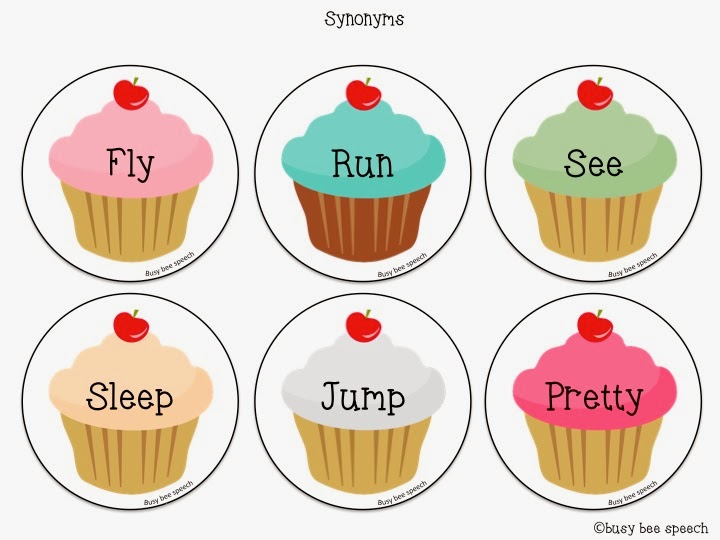
Yay cupcakes!  And one thing I feel like I'm constantly working on in therapy is vocab.  Plus it's part of the Common Core Standards across most grade levels, especially synonyms and antonyms.

Well this download lets you practice just that, using yummy cupcakes with cherries on top.  It comes with 12 pairs of synonyms and 12 pairs of antonyms.


I like to cut out the circles using a scalloped 3 inch circle punch just to make it extra cutesie.  This game can be played like memory or just have the student find the appropriate match among an array.  Use it however you'd like!

You can download this freebie from my TPT store HERE!

So what do you think?  Do you target a lot of vocabulary goals in your speech room?
Related Posts Plugin for WordPress, Blogger...